


Ace Hardware: Home Improvement
4.79.47K Reviews
App Specs
- Version
- 4.1.3
- Updated On
- License
- Free
- Downloads
- 1,000,000+
- Developer
- Ace Hardware Corporation
- Categories
- Shopping
- Platform
- Android, iOS
Screenshots
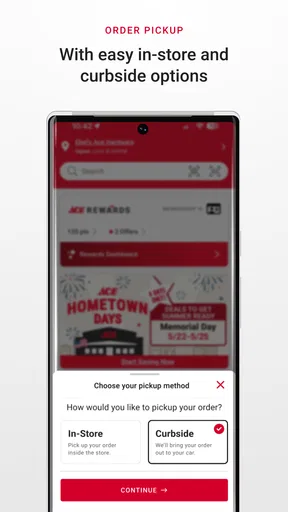
 Analysis by AppCompare
When I’m standing in a hardware aisle with a half-finished repair waiting at home, the hard part is often not finding a store but working out which item will actually solve the problem. The Ace Hardware app is designed around that kind of shopping: it puts product browsing, store information, and offers in one place. I find it most useful as a companion to a specific errand or project, rather than as a substitute for knowing what the job requires.
Where shopping can get stuck
Hardware searches can be awkward because people often know what a part does without knowing its name. I’d start with the simplest description I can think of, then narrow the results by checking product details rather than relying on the first match. A screw that looks close in a thumbnail may still be the wrong type or size, and a paint product is not interchangeable with every other paint simply because the label sounds familiar.
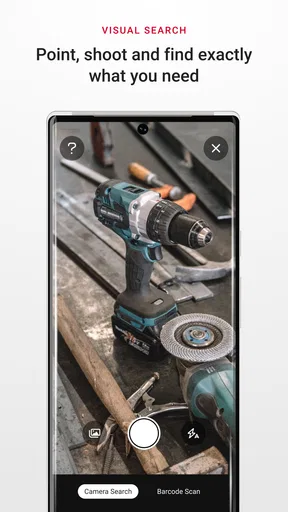
The app’s search and barcode scanner offer two different ways to get oriented. Search is useful when I’m planning at home or trying to identify a category; scanning is more practical when I’m already in a store and have packaging or an existing product in hand. I would treat the scan as a shortcut to information, not proof that an item is suitable for a repair. For anything where dimensions, compatibility, or safety matter, I still compare the details with the part or instructions I’m working from.
Simple checks before heading out
Before making a trip, I’d choose the store I actually intend to visit and check its information in the locator. Store hours and directions are more useful when tied to the right location, especially if I’m away from home or visiting a different town. If the app shows several nearby options, I’d take a moment to select the intended one instead of assuming the closest result is automatically the most convenient.
I also find it helpful to make a short shopping note before opening product search. For a repair, that might include the item being replaced, any measurements I already know, and the tools I have on hand. This keeps browsing focused and makes it easier to notice when I’m looking at a similar but unsuitable product. The app can help me investigate choices, but it cannot inspect a damaged fitting or measure a gap in my home.
A useful habit is to verify the exact product details before travelling, particularly when the item is central to the job. Search results can help me identify what to ask for, while the store locator helps me plan where to go. I would not assume that seeing a product in the app alone means it is available at a particular branch; if the errand depends on one specific item, confirming the situation with the store is the more dependable step.
Recovering when a search or scan is unhelpful
If a search brings up too many possibilities, I’d change the wording rather than keep scrolling through loosely related results. Starting with the object or task, then trying a more specific material or part name, can make the results easier to assess. When I’m unsure of a term, scanning the label on an existing item may give me a more precise starting point. If neither route makes the choice clear, asking a store employee with the old part or a photo can be more effective than guessing from a screen.
Worth Reading Before You Choose

EA SPORTS FC Mobile 26 Is a Bigger Football Game, but It Takes Time

Flipboard Shows What News Apps Must Do Beyond the Feed

Switching to Android Auto Means Rethinking Your Driving Routine

Google Calendar Makes a Crowded Week Easier to Manage

Ludo King Makes the Most of the Minutes Between Plans

Baby Panda World Brings Quick Play to Modern Phones, but Its Game Library Feels Busy
A barcode scan also depends on having a readable code and a product that can be identified that way. If it does not produce a useful result, I’d check that I’m scanning the product label rather than unrelated packaging, then fall back to typing the name or reading the printed details. The practical value is speed when the scan works; it is not a reason to let a failed scan hold up the rest of a shopping trip.
When the problem is not the app
Some shopping frustrations come from the job itself. A leaking connection, an unfamiliar fastener, or a paint surface that needs preparation may call for advice and inspection that a search result cannot provide. I use the app to narrow down what I need and prepare better questions, but I would not rely on it as a substitute for technical guidance when a mistake could damage property or create a safety issue.
Likewise, a store locator can help me find a nearby branch, but the route, local opening hours, and availability of a particular product are separate practical questions. If timing matters, I check the store details before leaving and keep a backup plan for an essential part. That small bit of preparation is often more useful than repeatedly refreshing a search while already on the road.
Getting Started with Ace
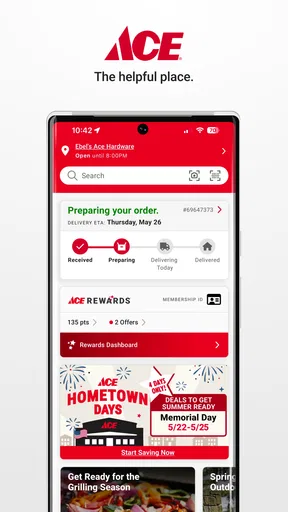
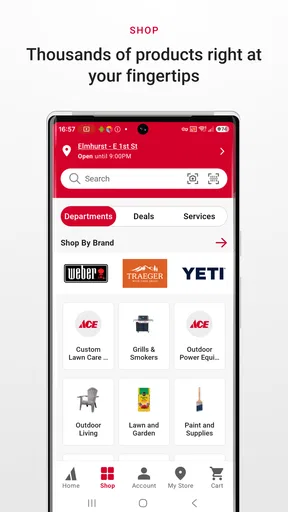
First things first, let’s talk about getting the Ace Hardware app on your phone. It’s available on both Android and iOS, which is a huge plus. Installation is a breeze, and once you’ve got it up and running, you’re greeted by a user-friendly interface that makes you feel right at home. The layout is intuitive, with tabs that easily guide you to different sections like deals, store locator, and product search.
Navigating the Features
One of the standout features of this app is its robust search functionality. Whether you’re searching for a specific nut or just browsing for inspiration, the app’s search bar is your best friend. Just type in what you need, and voila, you’re presented with a range of options, complete with product details and pricing. This feature alone saves you time wandering through endless aisles.
But wait, there’s more! The app also offers a handy barcode scanner. You can use it while you're in the store to quickly pull up product information and reviews. It’s like having a personal shopper who knows everything about what’s on the shelves.
Deals and Rewards
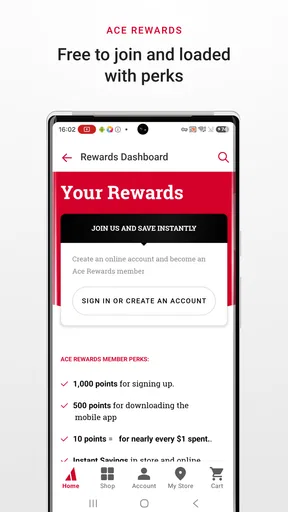
Who doesn’t love a good deal? The Ace Hardware app keeps you in the loop with the latest promotions and discounts. The "Hot Deals" section is regularly updated, ensuring you never miss out on a bargain. Plus, if you’re a member of the Ace Rewards program, you can easily track your points and redeem rewards directly from the app. It’s a seamless way to make your purchases even more rewarding.
I see the offers as a useful extra, not a shopping plan by themselves. If I’m buying supplies for a repair, I first settle on the right materials and only then look at promotions. That order helps me avoid choosing an unsuitable product just because it appears in a deal section. The rewards tools make most sense for people who already shop with Ace; someone who visits only occasionally may not get much practical value from tracking rewards.
Finding Your Nearest Store
Whether you’re on a road trip or just moved to a new town, finding the nearest Ace Hardware store is a cinch. The app’s store locator uses your location to show nearby stores, complete with directions and store hours. No more guessing or searching online—it’s all right there in the app.
For an everyday example, imagine a cabinet hinge breaks while I’m cooking. I can search for the type of hinge or scan the old packaging if I still have it, then check a nearby store before setting out. I’d bring the old hinge or a clear picture and compare its shape and measurements in person. That workflow is more reliable than ordering by appearance alone, especially when the replacement has to line up with existing holes.
DIY Inspiration and Tips
For those days when you’re feeling crafty, the app offers a treasure trove of DIY project ideas and tips. From simple home repairs to elaborate garden projects, there’s something for everyone. The step-by-step guides are easy to follow, making even the most daunting tasks seem manageable. It’s like having a DIY mentor available at the tap of a finger.
I’d use project guidance to understand the broad sequence of a job and make a supply list, then check whether the instructions fit my actual materials and situation. A general guide can be a good starting point for a small, familiar task, but unusual surfaces, older fittings, or damage hidden behind a wall can change what the job requires. If a project involves electrical work, structural changes, or another higher-risk task, I would seek appropriate expertise instead of treating an app guide as a complete safety assessment.
Who will get the most from it
This shopping app is a natural fit for homeowners, renters who handle small fixes, and DIYers who regularly need supplies from Ace. It can also help someone who is new to a project by giving them a place to begin looking up products and ideas. The developer is Ace Hardware Corporation, and the app is free, so trying its shopping tools does not require an upfront purchase.
It is less compelling if you rarely visit Ace, already know exactly what you need, or prefer comparing a broad range of retailers before buying. A general shopping marketplace may be a better first stop when price comparison across many sellers is the priority. A dedicated store visit may be better when you need hands-on help selecting a part. The app’s strongest role is connecting Ace-focused browsing with a real shopping trip, not covering every possible source or replacing in-person judgement.
What to expect from the app over time
The app is in the shopping category, has an Everyone age rating, and has a 4.7 average from around 86,000 ratings. It has been installed over a million times, which suggests it is familiar to a substantial group of shoppers, though popularity does not guarantee that every search will fit an individual project. Its current version is 4.0.8, and it requires Android 7.1 or later on Android devices.
Those details make it easy to judge whether it is suitable for a device and household, but my decision would still depend on how I shop. If I often need to locate supplies, check product information, or plan a visit to an Ace store, keeping it installed is reasonable. If I only need a one-off item, searching the app or using the store locator when needed may be enough; there is no need to turn a single repair into a long-term app habit.
Final Thoughts
In a world where convenience is king, the Ace Hardware app shines as a must-have tool for any DIY enthusiast or homeowner. Its comprehensive features are designed to make your shopping experience smooth and enjoyable, whether you’re in-store or planning your next big project from home. So next time you’re gearing up for a project, give the app a whirl. You might just find it’s the hardware helper you never knew you needed.
My more measured verdict is that it earns its place when it shortens the path from a household problem to a well-planned store visit. Search, scanning, offers, rewards, the locator, and DIY ideas each serve a different part of that journey. The trade-off is that digital product information cannot confirm fit or solve every technical question, so I still double-check the details that matter and ask for help when the repair calls for it. For Ace shoppers who like to prepare before they browse, that balance makes it a useful tool rather than just another store app.
Pros
- User-friendly interface for easy navigation.
- Wide range of products and categories.
- Real-time inventory updates.
- In-app loyalty rewards and discounts.
- Secure online payment options.
Cons
- Limited search filter options.
- Occasional app crashes reported.
- Slow loading times on older devices.
- Infrequent updates and bug fixes.
- Limited customer support availability.
FAQs for Ace Hardware: Home Improvement
What features does the Ace Hardware app offer?
The Ace Hardware app provides a seamless shopping experience with features like product search, store locator, and exclusive deals. Users can browse the extensive catalog, access DIY project ideas, and manage their Ace Rewards. The app also allows for easy online ordering and in-store pickup, making it convenient for all users.
Is the Ace Hardware app free to download and use?
Yes, the Ace Hardware app is completely free to download and use on both Android and iOS devices. While the app itself doesn't require any purchases, users can shop for products directly through it. Some features, like Ace Rewards, may require account registration.
How do I locate my nearest Ace Hardware store using the app?
The Ace Hardware app includes a store locator feature that allows users to easily find the nearest store. By enabling location services on your device, the app will automatically display nearby stores. Users can also enter a zip code or city to find stores in specific areas.
Can I track my orders through the Ace Hardware app?
Yes, the app provides order tracking functionality. Once you've made a purchase, you can view your order history and track the status directly within the app. Notifications and updates on your order will also be provided to keep you informed about your delivery or pickup.
What is the Ace Rewards program and how does it work in the app?
Ace Rewards is a loyalty program that offers members points for purchases, which can be redeemed for discounts. Through the app, users can join the program, track their points, and view available rewards. The app also provides personalized offers and notifications about special promotions exclusive to Ace Rewards members.


